Nothing To Declare Troubleshooting & FAQ
Post-launch answers for bills, Day 6/8 stalls, save issues, and the questions players ask now.
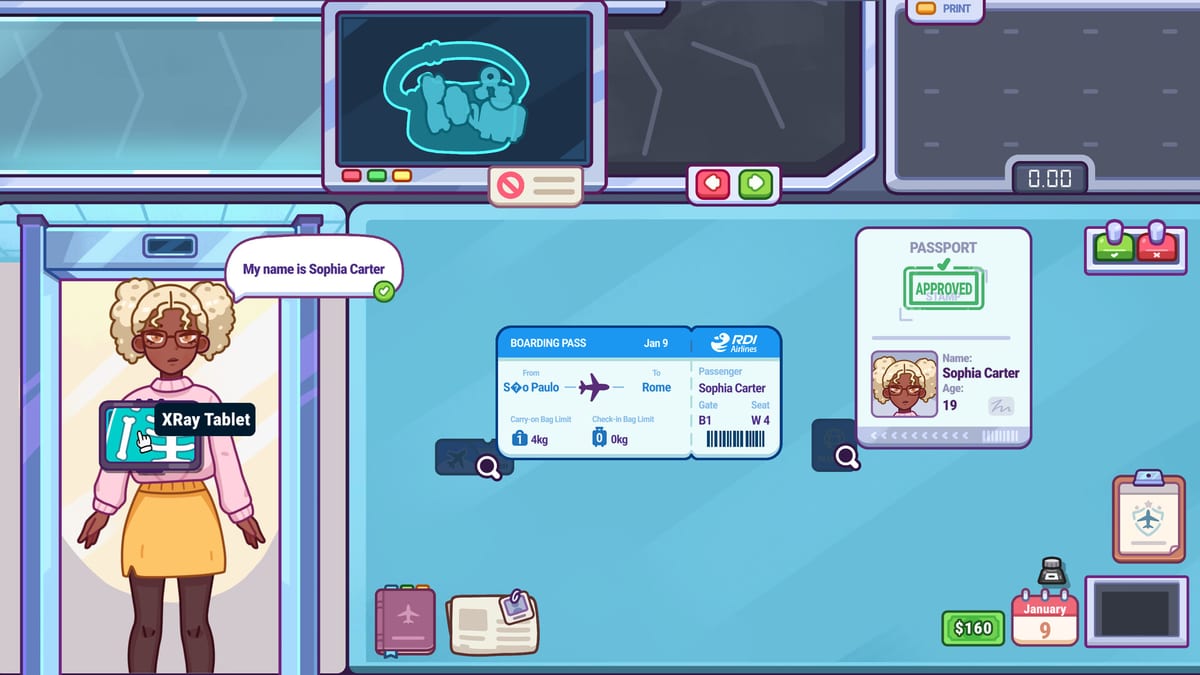
This Nothing To Declare troubleshooting guide tracks post-launch community questions after the July 25, 2026 Steam release. As of late July 2026 there is still no public v1.0.2 patch note—the latest confirmed fix remains v1.0.1. This page focuses on practical desk habits for issues players report in discussions (now 105+ active threads): unpaid bills, backpack tags, work permits, age or newspaper restrictions, high-risk passengers, security cameras, Day 6/8 stalls, save and lobby problems, smart watch cases, bag glitches, disposal, confiscation, X-ray readability, and missing quit options. Use it as a triage page before you assume your save is broken.
For core play, start with How to Play, First Shift Tips, Documents & Daily Rules, Day Progression, and Full Game Systems. For confirmed official fixes, use Updates and v1.0.1 Patch Notes.
First: separate bug, rule, and habit
Most post-launch confusion falls into three buckets. A bug is a UI or rule state that does not respond as described. A rule miss is legal text you skimmed or remembered from yesterday. A habit problem is a rushed click, especially around labels, bills, cameras, and X-ray passes. Before posting or restarting, slow down for one passenger and record what the game asked, what you clicked, and what result appeared.
That tiny log matters because Nothing To Declare is a process game. If a case involves documents, route it through Documents & Daily Rules. If it involves tools like cameras, Cookie, swabs, or high-risk travelers, route it through Full Game Systems. If progression stalls on a specific day, read Day Progression. If it involves money, read Earning Money before spending your last cash.
Unpaid bills and no money to withdraw
Community threads now mention unpaid bills and the lack of a clear warning before money becomes tight. Treat bills as part of shift planning, not an afterthought. Do not spend every good day on upgrades or Duty-Free because the next bill can punish a desk that looks successful on the surface.
Practical approach:
- After each shift, check cash before shopping.
- Keep a reserve instead of buying the next upgrade immediately.
- If you are already short, play the next shift for clean calls, not risky bribes.
- Revisit Earning Money and delay cosmetic or convenience spending until bills are stable.
If the UI gives no warning, the safest player habit is a manual reserve. It is boring, but it keeps progression from feeling like a surprise tax.
Selecting backpack tags and baggage labels
Tag selection problems usually happen because players click the bag body, not the active tag, or try to rush while the inspection view is still settling. Move deliberately: let the bag finish presenting, zoom or hover if the interface allows it, then target the label itself. If a label matters to a rule, say the rule out loud before clicking so you do not mix up ownership, destination, or item status.
Labels belong to the document layer. Compare them against passports, boarding passes, work permits, event invitations, and the newspaper before you decide. If the tag conflicts with the traveler story, interview first; if it conflicts with a posted restriction, escalate faster.
Work permits and event invitations
Work permits and event invitations are easy to misread because they feel like flavor until they contradict the rest of the case. Read them as permission documents: who, why, where, and under what condition. Then compare against the passenger’s spoken reason and the daily newspaper.
A reliable script is: name match, destination match, stated reason match, date or event context, then bag evidence. If one document is clean but another disagrees, you do not have a clean traveler. Ask a targeted interview question and avoid clearing just because the suitcase looks harmless.
Newspaper restrictions: age, reason, and Day 21/26 reports
Several launch-week discussions mention newspaper restrictions, including age mismatch, travel reason, and later-day restrictions. The safe habit is to treat the newspaper as a fresh legal object every day. Do not reuse yesterday’s category, and do not assume a restriction only applies to contraband if the text names people, ages, reasons, surnames, or destinations.
If a newspaper case feels wrong, make a short reproduction note: day number, exact restriction, passenger detail, your decision, and result. Then check whether the issue matches known fixed regulation/localization problems in v1.0.1. Until a later patch is confirmed, the player-side workaround is slower reading and clearer notes.
High-risk passengers
High-risk does not mean instant guilty. It means your tolerance for ambiguity should drop. Start with documents, then use the fastest physical tell: weight, metal, or X-ray. If a camera or Cookie clue supports the risk, escalate. If every channel agrees they are clean, clear them, but do not skip steps because the queue is loud.
Think of high-risk as a priority flag. It changes how soon you use tools, not the standard of proof.
Security cameras and command panel confusion
Cameras are context tools. Use them when the desk view leaves a gap: suspicious movement, a handoff, a traveler who seems too rehearsed, or a high-risk case that needs another angle. Do not park your attention on cameras while normal passengers pile up.
If the command panel or camera UI feels unclear, run one practice shift where your only goal is opening and closing the panel cleanly. Pair camera checks with a written reason: “document mismatch,” “high-risk flag,” or “bag handoff suspicion.” If you cannot name the reason, return to the desk loop.
X-ray machine colors
Players asking for X-ray colors are usually asking for readability. Until the game exposes more color controls, build a repeatable scan pass: outline first, dense objects second, electronics third, organic or liquid-looking clusters fourth. Color helps, but sequence catches more.
Use X-Ray Scanning for silhouette habits. If a scan is visually noisy, do not stare longer forever. Cross-check weight, label, interview, and search threshold.
Confiscation, disposal, and close buttons
Confiscation should be the end of an evidence chain, not a panic click. v1.0.1 already adjusted the confiscation close button position, so update first if the UI feels off. For disposal suggestions or confusion, keep the rule simple: only remove or confiscate what a posted rule or confirmed inspection justifies. Over-cleaning the bag can be as harmful as missing a threat.
When the case is messy, pause before the final click and state the evidence: rule, document, physical clue, confirmation. If you cannot state it, you are guessing.
No quit option or save concern
Some discussion threads mention missing quit options and saving issues. Avoid force-closing during a decision moment. Finish the current passenger or shift screen when possible, then exit from a stable menu. If you suspect a save bug, note the day, cash, active bill state, and last action before leaving. That information is more useful than “it broke.”
Newer reports specifically mention save function not working and lobby screen issues. Try finishing the active passenger, returning to a stable lobby or menu, then exiting normally. If progress still fails to persist, record platform (Windows/macOS/Linux), day number, and whether you were inside confiscation, search, or camera UI when you quit. Post that bundle on Steam discussions linked from Official Links.
Smart watch, weird bags, and Day 6/8 stalls
Players also report smart watch interactions that freeze a case, weird bag glitches on Day 6, and “how do I pass Day 8?” difficulty spikes. Before calling it a hard bug:
- Confirm the bag animation finished and you clicked the tag—not just the suitcase body.
- Re-read today’s newspaper for age, travel reason, surname, or item bans.
- Check whether a wearable or electronic is part of the suspicion chain.
- Verify v1.0.1 is installed.
If the stall is day-specific rather than UI-specific, switch to Day Progression for structured mid-game habits instead of restarting blindly.
Quick triage checklist
Use this order when something feels wrong:
- Read today’s newspaper again.
- Re-check documents and labels.
- Repeat the physical clue: weight, X-ray, metal, or camera.
- Ask one targeted interview question.
- Search, swab, confiscate, or clear only when the evidence chain is defensible.
- If the UI itself failed, record day, case, and action, then check Official Links for Steam discussions or patch news.
Nothing To Declare is cozy, but launch week is noisy. Build calm notes, keep cash reserves, and let confirmed evidence drive the desk.
Frequently Asked Questions
Quick answers to the most common questions.
Is there a Nothing To Declare v1.0.2 patch?
No public v1.0.2 patch note was found during the late July 2026 check. The latest confirmed patch page here remains v1.0.1.
How should I handle unpaid bills?
Keep a cash reserve after shifts and delay nonessential upgrades or Duty-Free spending until bills are stable.
Are high-risk passengers automatically guilty?
No. Treat them as priority cases that deserve earlier tool use, not instant convictions.
What should I do if newspaper rules seem wrong?
Re-read the exact text, note day and passenger details, check v1.0.1 regulation fixes, and avoid relying on yesterday's memory.
Where do I report a real bug?
Use the official Steam discussions linked from the Official Links hub, with day number, restriction text, action, and result.